Your website can be an app now
Let visitors sign in, book, post and see their own entries. Keep the data in the Xodia database or your own Supabase, run small server tasks, and keep the site as plain code you own.
Free plan. No card needed.
Xodia's Content tab on a bakery's Xodia database: Test data and Live data, the data kept in Oceania, three tables, Classes, Bookings and Reviews, each with who can see and change its entries, Signed-in people, and Sign-in with email and password or a code sent by email.
App templates
Six finished apps to start from
Each one is a whole website with the app part built in, working on sample entries from the first minute.
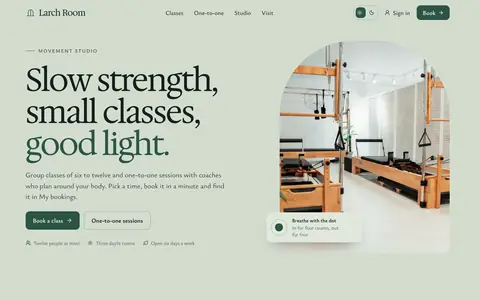
Appointments and classes
For studios, coaches, salons, clinics, tutors and gyms
Services or classes with a booking calendar, My bookings for each person, and an owner view of who is coming.
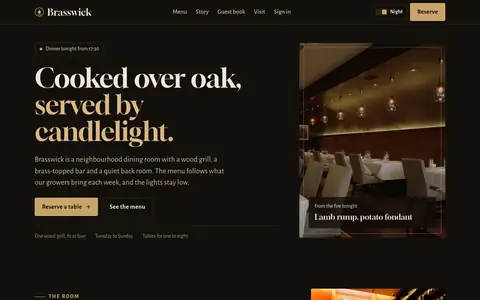
Restaurant
For restaurants, cafes and bars
A menu kept in a table, table bookings by party size, guest reviews, and tonight's bookings for the owner.
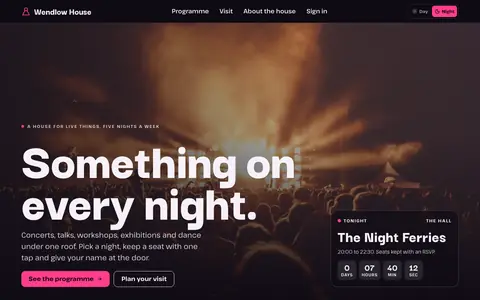
Events and RSVPs
For venues, workshops, meetups and festivals
An events calendar, a page for each event, RSVPs with a seat count, and My tickets for each guest.
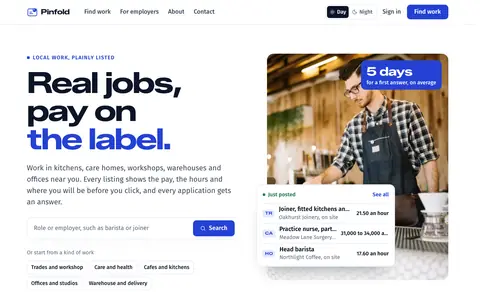
Listings and jobs
For job boards, property and local listings
Listings with search and filters, a page for each listing, a form to post one, and a way to apply or ask.
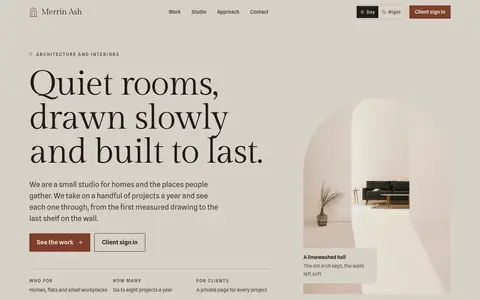
Client portal
For freelancers, studios, agencies and photographers
A public portfolio, and a signed-in area where each client sees their projects, updates and files, and approves work.
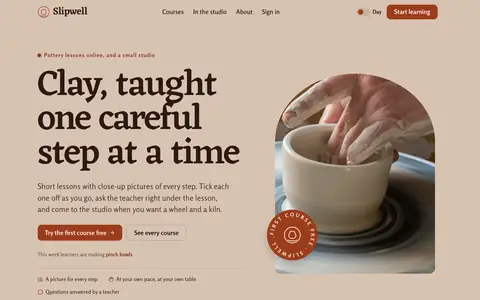
Courses and lessons
For creators, teachers and trainers
Course pages and lessons, enrolment, each learner's progress, and My courses to pick up where they left off.


App blocks
Drop in an app block, in your site's style
Add a block and pick one: make its table for me, use a table I have, or keep sample entries for now.
Lists and pages
Show entries as cards, a list, number cards or a chart, with a page for each entry.
Forms that save
A form saves each answer as an entry, and Edit my profile keeps each person's details up to date.
Sign-in pieces
Sign in, Create account, Reset password and an Account menu, styled like anything else.
Bookings
Visitors pick a service, a day and a time. Full times show as full, and My bookings lets people cancel.
Calendars and tables
A month or week of anything with a date, and a table people sort and search that turns into cards on phones.
Search and filters
A search box and filter chips that narrow a list as people type and tap.
Comments and likes
A thread under an entry or a page, and a like button, for people who are signed in.
Uploads and boards
Pictures and files people upload, a checklist for each person, and boards where cards move between columns.
Your data
Three ways to keep your data
Pick one in the Content tab. You can start on sample entries and choose later.
- NewXodia database: built in, with nothing to set up. See the Xodia database
- Connect your Supabase: sign in, pick a project, and your entries stay in your own account.
- Sample entries: templates and blocks work on sample rows until you pick a database.
Xodia's Database view before a database is connected: Give your site a database, with two tiles, Use my Supabase and Xodia database, a database Xodia runs for you with nothing to set up.
Visitor sign-in
Accounts for your visitors
Choose how people sign in, then choose what each person sees.
Email and password
People make an account with their email and a password, and can reset it by email.
A code sent by email
People get a 6-digit code by email that works for 10 minutes, with no password to remember.
Google
Coming soonPeople sign in with their Google account.
Members-only pages
Turn on Only for signed-in people in a page's settings, or show a section only to people with a role.
See it as each person
View as switches the canvas between a visitor, a test person and each role.
Who can join
Let anyone make an account, or only the people you add, and give people a role such as staff.
Server tasks
Small server code for the jobs pages can't do
Send an email, take a payment, ask an AI service or run a daily check. Each task runs on Xodia, not in the visitor's browser.
- Keys stay sealed: your code and your AI never see them, and Xodia sends each one only to the service you named
- Run a task on a schedule, every day, week or month at a time you pick
- Start from five ready-made tasks, ask your AI, or write your own
Xodia's Server tasks with All tasks open: add a ready-made task, ask your AI or write it yourself, then the bakery's three tasks, Contact, Ai reply, which needs its AI service key, and Daily job, which runs every day at 9:00.
Safe by default
Checked before it goes live
Xodia checks your server code and your tables, and says what to fix in plain words.
Every task is checked
Each new version of your server code is checked when you go live. Ready-made tasks you haven't changed go straight through.
Held if it looks unsafe
If something looks unsafe, that version stays held until Xodia's team checks it. Your preview keeps working meanwhile.
Tables checked too
Finds tables anyone can change and secret keys visitors could read, each with a Fix it button.
Security check
Fix an open table in one click
Go live runs the Security check and warns you before anything open reaches your live site.
- Each problem says what is open and who could change it
- Fix it lets you choose who can see and change the table
Xodia's Database view with the Security check open: 2 things to fix. Anyone can change the Reviews table, and the booking form shows to everyone, each with its plain explanation and a Fix it button.
Install as an app
On your visitors' home screens
Turn on Install as an app in Project settings. Visitors add your site to their phone and open it full screen, even offline.
Xodia's Project settings on App: Install as an app is on, with the app's name Rise Bakery, its icon, its colour and More, and a phone home screen showing the icon among the others.
Plans
Apps on every plan
Every plan has a database, sign-in and server tasks. Xodia database numbers count all your sites together. Every other limit is on the pricing page.
| Limit | Free$0 / month | Starter$9 / month | Pro$19 / month | Agency$49 / month |
|---|---|---|---|---|
| Data | ||||
| Sites with a database | 1 | 3 | 10 | 50 |
| Tables per site | 3 | 10 | 30 | Unlimited |
| Xodia database | ||||
| Entries | 500 | 10,000 | 100,000 | 200,000 |
| Signed-in people | 50 | 1,000 | 10,000 | 10,000 |
| Reads a month | 10,000 | 100,000 | 150,000 | 150,000 |
| Writes a month | 1,000 | 10,000 | 15,000 | 15,000 |
| Storage | 50 MB | 100 MB | 250 MB | 500 MB |
| Server tasks | ||||
| Sites with server tasks | 1 | 1 | 2 | 3 |
| Calls a month | 2,000 | 15,000 | 30,000 | 30,000 |
| Schedules per site | None | 2 | 10 | 25 |
| Runs as often as | None | Every hour | Every 15 minutes | Every 5 minutes |
Free$0 / month
Data
- Sites with a database
- 1
- Tables per site
- 3
Xodia database
- Entries
- 500
- Signed-in people
- 50
- Reads a month
- 10,000
- Writes a month
- 1,000
- Storage
- 50 MB
Server tasks
- Sites with server tasks
- 1
- Calls a month
- 2,000
- Schedules per site
- None
- Runs as often as
- None
Starter$9 / month
Data
- Sites with a database
- 3
- Tables per site
- 10
Xodia database
- Entries
- 10,000
- Signed-in people
- 1,000
- Reads a month
- 100,000
- Writes a month
- 10,000
- Storage
- 100 MB
Server tasks
- Sites with server tasks
- 1
- Calls a month
- 15,000
- Schedules per site
- 2
- Runs as often as
- Every hour
Pro$19 / month
Data
- Sites with a database
- 10
- Tables per site
- 30
Xodia database
- Entries
- 100,000
- Signed-in people
- 10,000
- Reads a month
- 150,000
- Writes a month
- 15,000
- Storage
- 250 MB
Server tasks
- Sites with server tasks
- 2
- Calls a month
- 30,000
- Schedules per site
- 10
- Runs as often as
- Every 15 minutes
Agency$49 / month
Data
- Sites with a database
- 50
- Tables per site
- Unlimited
Xodia database
- Entries
- 200,000
- Signed-in people
- 10,000
- Reads a month
- 150,000
- Writes a month
- 15,000
- Storage
- 500 MB
Server tasks
- Sites with server tasks
- 3
- Calls a month
- 30,000
- Schedules per site
- 25
- Runs as often as
- Every 5 minutes
Server tasks for one more site
$8 a month a site, with its own 100,000 calls a month. On Starter, Pro and Agency.
More data for one site
$8 a month a site, with its own 500,000 reads and 50,000 writes a month, 100,000 entries, 10,000 signed-in people and 1 GB of storage. On Starter, Pro and Agency.
Your AI
Your own AI can build the app too
Connect the AI app you already use, or ask Xodia AI. Either one works with the same tables, blocks, tasks and checks.
Tools for your data
Your AI can add tables and fields, add an app block with the tables it needs, and write a server task.
Skills for apps
Skills guide it from your idea to tables, blocks, sign-in and tasks, then through the checks. See every skill
Asks before it changes
Your AI asks before it adds tables, never sees a key's value, and can't delete tables or entries.
Questions
Apps questions
Do I need a Supabase account?
No. Use the Xodia database, with nothing to set up, or connect your own Supabase if you already use it. Until you pick one, templates and blocks run on sample entries.
Who owns the data?
You do. Download your Xodia database any time, or keep your entries in your own Supabase project. Your site's code is yours either way. See the Xodia database
Can my app send emails or take payments?
Yes, with server tasks. Start from a ready-made task to send an email, take a payment, answer with AI, call a service or check your pages every day, using your own keys. Server tasks in the docs
Does Xodia check my server code?
Yes. Each new version is checked when you go live. If something looks unsafe, it stays held until Xodia's team checks it, and your preview keeps working meanwhile.
Can I still edit the rest of my site visually?
Yes. An app is your website with more in it. You edit every page, block and style on the canvas as before.
Keep exploring
Related pages
- Xodia databaseA database built in, with test and live data
- Xodia CMSCollections in your repo, a page for every item
- Xodia FormsForm messages by email and in Studio, on any host
- AI in XodiaXodia AI built in, or the AI app you already use
- TemplatesFree finished sites, each with a live demo
- Xodia hostingGo live in one click, with your own domain
- SecurityIsolated previews, encrypted secrets and roles
- PricingPlans, limits and what Free includes
Step by step in the docs